

Integration von LiFePO4-BMS and Smoke Alarm in HA
Ich habe neulich meine herkömmliche Autobatterie (Blei-Säure) durch eine KEPWORTH 12V 100Ah LiFePO4 mit integriertem 100A-Bluetooth-BMS ersetzt.
Über das integrierte JBD (Jiabaida) Bluetooth-BMS werden in Echtzeit die Daten wie Spannung, Strom, Kapazität (SOC) und Zellspannungen geliefert.
1. Integration einer LiFePO4-BMS-Batterie in Home Assistant (ESP32)
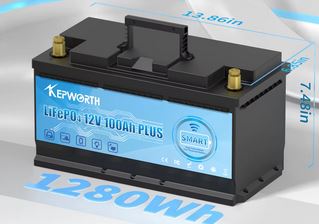
Die Überwachung und Konfiguration erfolgt mobil über die Xiaoxiang BMS App (verfügbar im App Store/Play Store).
Für das Pairing ist normalerweise kein Passwort erforderlich, und falls doch ein Passwort benötigt wird, lautet es üblicherweise 000000 oder 123456.
Nun gibt es verschiedene JBD-BMS-Modelle und es gibt auch mehrere Methoden, um JBD-BMS-Daten mit einem ESP32 auszulesen.
Meiner Meinung nach eignet sich die bewährte Library von esphome-jbd-bms-Software perfekt zum Auslesen der BMS-Daten dieser Batterie.
Der Vorteil dieser Software liegt in der automatischen Erkennung des BMS über die MAC-Adresse. (darauf achten, dass keine andere App die Bluetooth-Verbindung blockiert).
Ich verwende einen ESP32-S3 Zero Mikrocontroller, weil er über integriertes Bluetooth verfügt und als Bridge für die Kommunikation mit dem BMS über Bluetooth dienen kann.
Jump to the Code zum Auslesen von BMS-Daten
2. Integration eines RF-Rauchmelders in ESPHome
Da ich ohnehin schon am Basteln war, habe ich gleich noch einen Rauchmelder mit demselben ESP-Chip integriert.
Dafür habe ich meinen noch gut funktionierenden 433-MHz-Funkrauchmelder aus meinem alten System verwendet.
Um es mit ESPHome zu verbinden, entfernte ich den originalen RF-Transmitter und las das Alarmsignal direkt von der Platine ab.
Da das Signal eine Spannung von etwa 9V aufwies, habe ich es über einen Spannungsteiler auf 3,3V reduziert und an einem ADC-Pin (Analog-Digital-Wandler) gemessen.
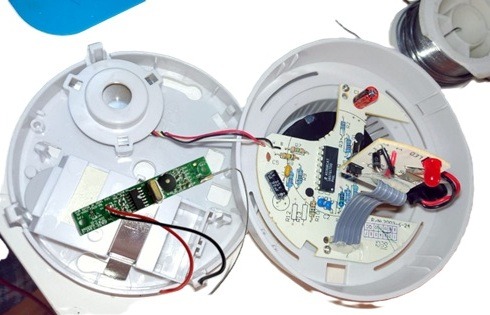
Der Einsatz des ADC-Pins anstelle eines digitalen GPIOs erlaubt es mir, Schwellenwerte genau zu definieren.
So kann ich sicherstellen, dass der Alarm erst ausgelöst wird, wenn die Spannung stabil über einem bestimmten Wert liegt, was die Zuverlässigkeit im Vergleich zu einer rein digitalen Abfrage erhöht.
In Home Assistant wird dieser Wert als Binärsensor ausgegeben, der im Alarmfall so konfiguriert ist, dass er aktiv bleibt, bis er manuell zurückgesetzt wird.
Die Stromversorgung des Rauchmelders erfolgte ursprünglich über eine 9V-Blockbatterie.
Diese habe ich durch zwei 18650-Lithium-Ionen-Akkus (2S-Konfiguration) ersetzt.
Um die benötigte Betriebsspannung für den ESP-Chip bereitzustellen, wird die 8.4V Akkuspannung über ein Mini560 DC-DC Step-Down-Modul effizient auf 3,3V geregelt.
Für die Akkuladeregelung nutze ich ein 2S 15W USB-C Lademodul mit Boost-Funktion. Dieses erhöht die 5V vom USB-Eingang auf die 8,4V, die für 2S erforderlich sind.
Dadurch kann der Rauchmelder wieder aufgeladen werden und hat eine deutlich längere Lebensdauer.
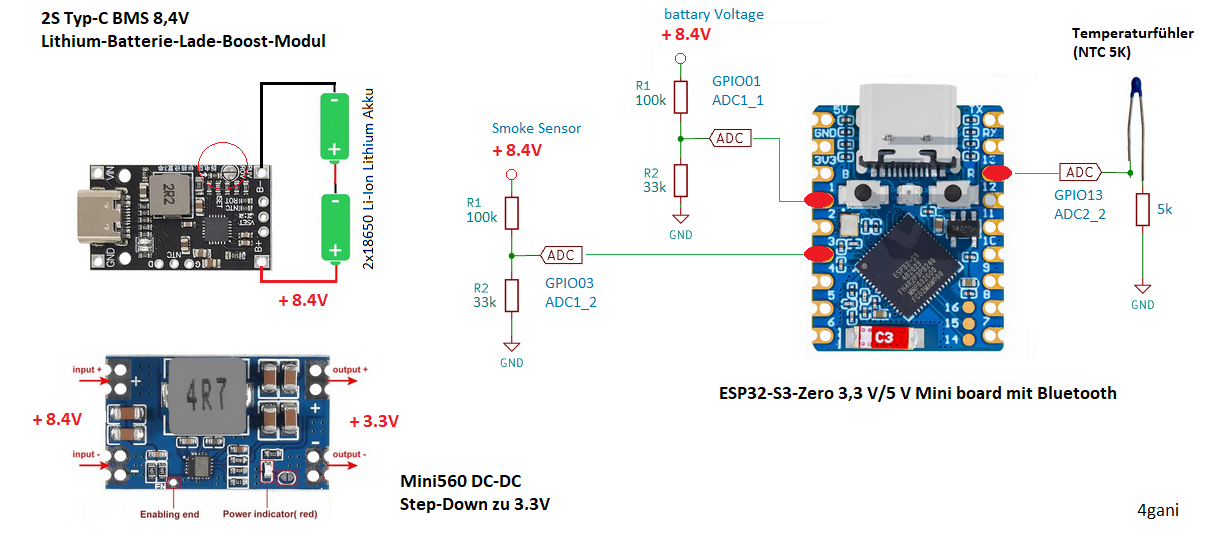
ESPHome-Code für Smoke Alarm
Dieser Code wurde für den ESP32-S3 Zero entwickelt, ist jedoch grundsätzlich mit allen Modellen der ESP32-Serie kompatibel.
Hinweis: Die Pin-Belegungen für die ADC-Eingänge (Analog-Digital-Wandler) und die Status-LED müssen für den jeweils verwendeten Mikrocontroller individuell im Code angepasst werden.
Folgende Daten werden durch das Modul erfasst und verarbeitet:
- Batteriespannung: Überwachung des aktuellen Ladestands der 2S-18650-Akkus.
- Akkutemperatur: Überwachung der 18650-Zellen mittels eines NTC-Thermistors, um die Sicherheit beim Laden und Entladen zu gewährleisten.
- Alarmsignal-Erkennung: Das Ausgangssignal des Rauchmelders wird kontinuierlich gemessen. Sobald ein definierter Schwellenwert überschritten wird, wird in Home Assistant ein binärer Schalter (Binary Sensor) aktiviert.
sensor:
  - platform: adc
    pin: GPIO03 # ADC1_2_
    id: adc_smoke_sensor
    internal: true
    attenuation: auto
    update_interval: 1s
    # Spannungsteilerfaktor: 1 / (33k / (100k + 33k)) = 4.03
    filters:
      - multiply: 4.09
      - calibrate_linear:
          datapoints:
            - 0.0 - 0.0
            - 8.4 - 8.4
    on_value:
        then:
          - if:
              condition:
                lambda: 'return id(adc_smoke_sensor).state gt 5;'
              then:
                - switch.turn_on: alarm_enabled

  - platform: adc
    pin: GPIO01 # ADC1_1_0
    name: "battary Voltage"
    id: bty_voltage
    unit_of_measurement: "V"
    accuracy_decimals: 2
    update_interval: 30s
    attenuation: auto
    icon: mdi:car-battery
    # Spannungsteilerfaktor: 1 / (33k / (100k + 33k)) = 4.03
    filters:
      - multiply: 4.09
      - calibrate_linear:
          datapoints:
            - 0.0 - 0.0
            - 8.4 - 8.4

  - platform: ntc
    sensor: resistance_sensor
    name: "Battery Temperature"
    unit_of_measurement: "°C"
    accuracy_decimals: 1
    icon: "mdi:thermometer"
    # Calibration using datasheet B-constant
    calibration:
      b_constant: 3950
      reference_temperature: 25°C
      reference_resistance: 5kOhm # ntc

  - platform: resistance
    id: resistance_sensor
    sensor: source_sensor
    configuration: DOWNSTREAM
    resistor: 5.6kOhm # to 3.3v
    reference_voltage: 3.3V

  - platform: adc
    id: source_sensor
    pin: GPIO13     # ADC2_2
    update_interval: 60s
    attenuation: auto

light:
  - platform: esp32_rmt_led_strip
    id: status_led
    pin: GPIO21
    chipset: WS2812
    max_refresh_rate: 15ms
    num_leds: 1
    rgb_order: GRB
    restore_mode: ALWAYS_OFF
    rmt_symbols: 192
    default_transition_length: 0ms
    effects:
      - pulse:
          name: "Fast Pulse"
          transition_length: 100ms
          update_interval: 100ms
          min_brightness: 50%
          max_brightness: 100%
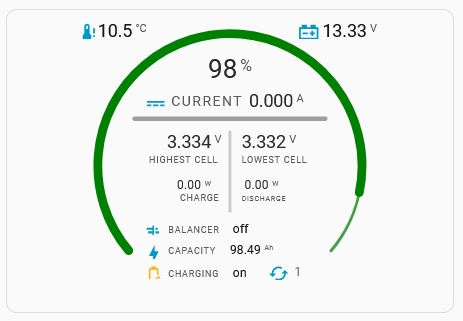
BMS Karte für Home Assistant Dashboard
Hier der YAML Code zur BMS Karte. Denkt daran, die Entität gegen eure zu ersetzen.
type: custom:flex-horseshoe-card
entities:
  - entity: sensor.bms_bluetooth_proxy_state_of_charge
    decimals: 0
    unit: "%"
    name: BMS Battery
    tap_action:
      action: more-info
  - entity: sensor.bms_bluetooth_proxy_battery_temperature
    decimals: 1
    unit: °C
    name: Temperature
    icon: mdi:thermometer-alert
    tap_action:
      action: more-info
  - entity: sensor.bms_bluetooth_proxy_total_voltage
    decimals: 2
    icon: mdi:car-battery
    unit: V
    tap_action:
      action: more-info
  - entity: sensor.bms_bluetooth_proxy_current
    name: Current
    decimals: 3
    unit: A
    icon: mdi:current-dc
  - entity: sensor.bms_bluetooth_proxy_max_cell_voltage
    name: highest cell
    decimals: 3
    unit: V
    tap_action:
      action: more-info
  - entity: sensor.bms_bluetooth_proxy_min_cell_voltage
    name: lowest cell
    decimals: 3
    unit: V
  - entity: binary_sensor.bms_bluetooth_proxy_charging
    name: charge
    icon: mdi:power
    tap_action:
      action: more-info
  - entity: binary_sensor.bms_bluetooth_proxy_discharging
    name: discharge
    icon: mdi:power
    tap_action:
      action: more-info
  - entity: binary_sensor.bms_bluetooth_proxy_balancing
    name: balancer
    icon: mdi:chart-gantt
    tap_action:
      action: more-info
  - entity: sensor.bms_bluetooth_proxy_capacity_remaining
    decimals: 2
    unit: Ah
    name: capacity
    icon: mdi:lightning-bolt
  - entity: binary_sensor.bms_bluetooth_proxy_charging
    decimals: 2
    name: charging
    icon: mdi:battery-sync-outline
  - entity: sensor.bms_bluetooth_proxy_charging_cycles
    decimals: 0
    name: cycles
    icon: mdi:cached
  - entity: sensor.bms_bluetooth_proxy_charging_power
    name: charging_power
    decimals: 2
    tap_action:
      action: more-info
  - entity: sensor.bms_bluetooth_proxy_discharging_power
    name: discharging_power
    decimals: 2
    tap_action:
      action: more-info
layout:
  icons:
    - id: 1
      entity_index: 1
      xpos: 2
      ypos: 5
      icon_size: 1.2
      color: "#2798F5"
    - id: 2
      entity_index: 2
      xpos: 77
      ypos: 5
      icon_size: 1.2
      color: "#2798F5"
    - id: 3
      entity_index: 3
      xpos: 25
      ypos: 29
      icon_size: 1.2
      color: "#2798F5"
    - id: 8
      entity_index: 8
      xpos: 15
      ypos: 72
      align: start
      icon_size: 1
      color: "#2798F5"
    - id: 9
      entity_index: 9
      xpos: 14
      ypos: 80
      align: start
      icon_size: 1.1
      color: "#2798F5"
    - id: 10
      entity_index: 10
      animation_id: 3
      xpos: 14
      ypos: 87
      align: start
      icon_size: 1.1
      color: "#2798F5"
    - id: 11
      entity_index: 11
      xpos: 56
      ypos: 87
      align: start
      icon_size: 1.2
      color: "#2798F5"
  hlines:
    - id: 0
      xpos: 50
      ypos: 34
      length: 65
      styles:
        - stroke-width: 3;
        - opacity: 0.4;
        - stroke-linecap: round;
  vlines:
    - id: 0
      xpos: 50
      ypos: 52
      length: 27
      styles:
        - opacity: 0.2;
        - stroke-linecap: round;
  states:
    - id: 0
      entity_index: 0
      xpos: 50
      ypos: 20
      styles:
        - font-size: 1.5em;
        - opacity: 0.9;
    - id: 1
      entity_index: 1
      xpos: 5
      ypos: 6
      styles:
        - text-anchor: start;
    - id: 2
      entity_index: 2
      xpos: 100
      ypos: 6
      styles:
        - text-anchor: end;
    - id: 3
      entity_index: 3
      xpos: 75
      ypos: 30
      styles:
        - text-anchor: end;
        - opacity: 0.9;
    - id: 4
      entity_index: 4
      xpos: 47
      ypos: 44
      styles:
        - text-anchor: end;
        - opacity: 0.9;
    - id: 5
      entity_index: 5
      xpos: 54
      ypos: 44
      styles:
        - text-anchor: start;
        - opacity: 0.9;
    - id: 6
      entity_index: 6
      xpos: 43
      ypos: 60
      styles:
        - text-anchor: end;
        - opacity: 0;
    - id: 12
      entity_index: 12
      xpos: 32
      ypos: 58
      styles:
        - text-anchor: start;
        - opacity: 0.9;
        - font-size: 0.7em;
    - id: 7
      entity_index: 7
      xpos: 60
      ypos: 60
      styles:
        - text-anchor: end;
        - opacity: 0;
    - id: 13
      entity_index: 13
      xpos: 55
      ypos: 58
      styles:
        - text-anchor: start;
        - opacity: 0.9;
        - font-size: 0.7em;
    - id: 8
      entity_index: 8
      xpos: 51
      ypos: 73
      styles:
        - text-anchor: start;
        - font-size: 0.7em;
    - id: 9
      entity_index: 9
      xpos: 50
      ypos: 80
      styles:
        - font-size: 0.7em;
        - text-anchor: start;
    - id: 10
      entity_index: 10
      xpos: 51
      ypos: 88
      styles:
        - font-size: 0.7em;
        - text-anchor: start;
    - id: 11
      entity_index: 11
      xpos: 72
      ypos: 87.5
      styles:
        - font-size: 0.7em;
        - text-anchor: start;
        - opacity: 0.7;
  names:
    - id: 0
      entity_index: 0
      xpos: 50
      ypos: 100
      styles:
        - font-size: 0.8em;
        - opacity: 0;
    - id: 3
      entity_index: 3
      xpos: 30
      ypos: 29.5
      styles:
        - text-anchor: start;
        - font-size: 0.8em;
        - opacity: 0.7;
    - id: 4
      entity_index: 4
      xpos: 46
      ypos: 49
      styles:
        - font-size: 0.5em;
        - text-anchor: end;
        - opacity: 0.7;
    - id: 5
      entity_index: 5
      xpos: 54
      ypos: 49
      styles:
        - font-size: 0.5em;
        - text-anchor: start;
        - opacity: 0.7;
    - id: 6
      entity_index: 6
      xpos: 33
      ypos: 62
      styles:
        - text-anchor: start;
        - font-size: 0.5em;
        - opacity: 0.7;
    - id: 7
      entity_index: 7
      xpos: 54
      ypos: 62
      styles:
        - text-anchor: start;
        - font-size: 0.4em;
        - opacity: 0.7;
    - id: 8
      entity_index: 8
      xpos: 29
      ypos: 73
      styles:
        - text-anchor: start;
        - font-size: 0.5em;
        - opacity: 0.7;
    - id: 9
      entity_index: 9
      xpos: 29
      ypos: 80
      styles:
        - text-anchor: start;
        - font-size: 0.5em;
        - opacity: 0.7;
    - id: 10
      entity_index: 10
      xpos: 29
      ypos: 88
      styles:
        - text-anchor: start;
        - font-size: 0.5em;
        - opacity: 0.7;
    - id: 11
      entity_index: 11
      xpos: 70
      ypos: 88
      styles:
        - text-anchor: start;
        - font-size: 0.6em;
        - opacity: 0;
animations:
  entity.6:
    - state: "on"
      icons:
        - animation_id: 0
          styles:
            - color: orange;
            - opacity: 0.9;
    - state: "off"
      icons:
        - animation_id: 0
          styles:
            - fill: var(--primary-text-color);
  entity.7:
    - state: "off"
      icons:
        - animation_id: 1
          styles:
            - fill: var(--primary-text-color);
    - state: "on"
      icons:
        - animation_id: 1
          styles:
            - color: orange;
            - opacity: 0.9;
  entity.10:
    - state: "on"
      icons:
        - animation_id: 3
          styles:
            - color: orange;
            - opacity: 0.9;
    - state: "off"
      icons:
        - animation_id: 3
          styles:
            - fill: var(--primary-text-color);
show:
  horseshoe_style: colorstopgradient
horseshoe_state:
  color: "#db4437"
  width: 6
horseshoe_scale:
  min: 0
  max: 110
  color: "#43a047"
  width: 2
color_stops:
  "65": red
  "75": yellow
  "85": green
card_mod:
  style: |
    ha-card {
        height: 340px !important;
        Box-shadow: none !important;
        background-color: transparent !important;
        --ha-card-background: var(--card-background-color);
        color: var(--primary-color);
      }
Code zum Auslesen von BMS-Daten
Der folgende Code basiert auf dem Beispiel esp32-ble-example.yaml aus dem syssi-Repository (GitHub: esphome-jbd-bms).
Ich habe das ursprüngliche Skript angepasst und alle für mein Projekt nicht relevanten Zeilen entfernt, um den Code schlank und übersichtlich zu halten.
Hinweis: Da meine 12V 100Ah LiFePO4-Batterie intern aus 4 Zellen besteht und das BMS keine Daten zur einzelnen Zelltemperatur übermittelt, wurden die entsprechenden Sensor-Entitäten aus dem Code entfernt.
Um den Energieverbrauch (WiFi & System) des ESP32 zu optimieren, wurden außerdem die folgenden Anpassungen an der YAML-Konfiguration vorgenommen:
| Maßnahme | Vorteil |
|---|---|
| Fast Connect | Schnellerer Verbindungsaufbau zum WLAN. |
| Power Save Mode (LIGHT) | Reduziert den Stromverbrauch im Leerlauf. |
| Static IP | Spart Zeit und Traffic beim DHCP-Handshake. |
# *******************************************************************************
# ESP32 S3 Mini Zero based
# ESPHome code to monitor and control a JBD-BMS via Bluetooth
# Aus Originalskript esp32-ble-example.yaml - syssi (GitHub: esphome-jbd-bms) Library
# ******************************************************************************

substitutions:
  name: jbd-bms-ble
  device_description: "Monitor and control a Xiaoxiang Battery Management System (JBD-BMS) via BLE"
  external_components_source: GitHub://syssi/esphome-jbd-bms@main
  mac_address: A5:C2:39:1A:E0:52
  log_level: "DEBUG" # "INFO" # "DEBUG"
  friendly_name: 'jbd-bms-ble and garage_smoke'

esphome:
  name: ${name}
  friendly_name: ${friendly_name}
  comment: ${device_description}
  project:
    name: "syssi.esphome-jbd-bms"
    version: 2.4.0

esp32:
  board: esp32-s3-devkitc-1
  framework:
    type: esp-idf


external_components:
  - source: ${external_components_source}
    refresh: 0s

packages:
  # Individual time estimation packages from remote repository
  remaining_charging_time:
    url: https://github.com/syssi/esphome-jbd-bms
    files:
      - path: packages/remaining_charging_time.yaml
        vars:
          sensor_id: bms0_remaining_charging_time
          sensor_name: "remaining charging time"
          current_sensor_id: bms0_average_current
          capacity_remaining_id: bms0_capacity_remaining
          nominal_capacity_id: bms0_nominal_capacity
  remaining_discharging_time:
    url: https://github.com/syssi/esphome-jbd-bms
    files:
      - path: packages/remaining_discharging_time.yaml
        vars:
          sensor_id: bms0_remaining_discharging_time
          sensor_name: "remaining discharging time"
          current_sensor_id: bms0_average_current
          capacity_remaining_id: bms0_capacity_remaining

wifi:
  power_save_mode: LIGHT # HIGH
  fast_connect: true
  ssid: !secret iot_wifi_ssid
  password: !secret iot_wifi_password
  # Optional manual IP
  manual_ip:
    static_ip: 192.168.178.xxx
    gateway: 192.168.178.1
    subnet: 255.255.255.0

logger:
  level: ${log_level}

ota:
  platform: esphome
  on_begin:
    then:
      - switch.turn_off: ble_client_switch0
      - logger.log: "BLE connection suspended for OTA update"

# Enable Home Assistant API
api:
  encryption:
    key: !secret encryption

esp32_ble_tracker:
  scan_parameters:
    active: false

ble_client:
  - id: client0
    mac_address: ${mac_address}

jbd_bms_ble:
  - id: bms0
    ble_client_id: client0

binary_sensor:
  - platform: jbd_bms_ble
    jbd_bms_ble_id: bms0
    balancing:
      name: "balancing"
    charging:
      name: "charging"
    discharging:
      name: "discharging"
    online_status:
      name: "online status"


sensor:
  - platform: jbd_bms_ble
    jbd_bms_ble_id: bms0
    battery_strings:
      name: "battery strings"
    current:
      name: "current"
      id: bms0_current
    power:
      name: "power"
    charging_power:
      name: "charging power"
    discharging_power:
      name: "discharging power"
    state_of_charge:
      name: "state of charge"
    nominal_capacity:
      name: "nominal capacity"
      id: bms0_nominal_capacity
    charging_cycles:
      name: "charging cycles"
    capacity_remaining:
      name: "capacity remaining"
      id: bms0_capacity_remaining
    battery_cycle_capacity:
      name: "battery cycle capacity"
    total_voltage:
      name: "total voltage"
    average_cell_voltage:
      name: "average cell voltage"
    delta_cell_voltage:
      name: "delta cell voltage"
    min_cell_voltage:
      name: "min cell voltage"
    max_cell_voltage:
      name: "max cell voltage"
    min_voltage_cell:
      name: "min voltage cell"
    max_voltage_cell:
      name: "max voltage cell"
    cell_voltage_1:
      name: "cell voltage 1"
    cell_voltage_2:
      name: "cell voltage 2"
    cell_voltage_3:
      name: "cell voltage 3"
    cell_voltage_4:
      name: "cell voltage 4"
    software_version:
      name: "software version"

  # Average current sensor with exponential filtering
  - platform: copy
    source_id: bms0_current
    name: "average current"
    id: bms0_average_current
    filters:
      - exponential_moving_average:
          alpha: 0.1
          send_every: 1
  # WiFi Signal sensor.
  - platform: wifi_signal
    name: WiFi Signal
    update_interval: 30s
    unit_of_measurement: dB
    accuracy_decimals: 0
    force_update: false
    icon: mdi:wifi

select:
  - platform: jbd_bms_ble
    jbd_bms_ble_id: bms0
    read_eeprom_register:
      name: "read eeprom register"
      id: read_eeprom_register0
      optionsmap:
        0xAA: "Error Counts"

switch:
  - platform: ble_client
    ble_client_id: client0
    name: "enable bluetooth connection"
    id: ble_client_switch0

  - platform: jbd_bms_ble
    jbd_bms_ble_id: bms0
    charging:
      name: "charging"
    discharging:
      name: "discharging"

text_sensor:
  - platform: jbd_bms_ble
    jbd_bms_ble_id: bms0
    errors:
      name: "errors"
    operation_status:
      name: "operation status"
    device_model:
      name: "device model"
  - platform: wifi_info
    ip_address:
      name: IP Address
    mac_address:
      name: Mac Address